Tuesday, February 15, 2011
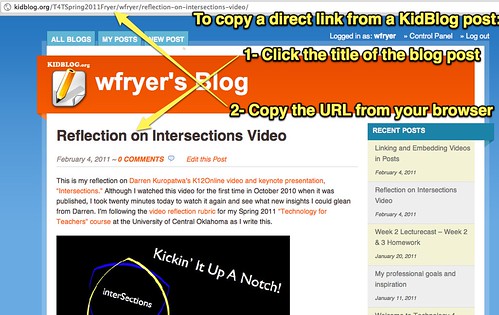
Find the direct link to a KidBlog blog post
For our "checkpoint blog post quizzes" for class, and other assignments, you need to copy and paste the DIRECT URL or web link to the blog post you wrote for a specific class assignment. The following screenshot shows where you can click on our EduBlogs blog posts to get a particular blog posts' "permalink." Make sure you copy THAT link when you are viewing a post.

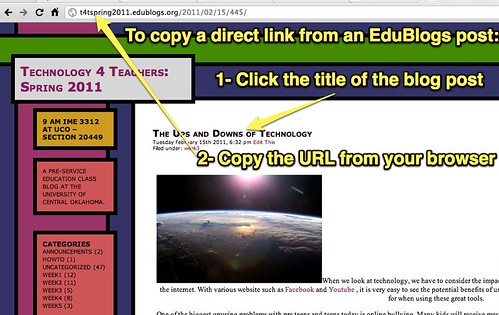
Find the direct link to a EduBlogs blog post
For our "checkpoint blog post quizzes" for class, and other assignments, you need to copy and paste the DIRECT URL or web link to the blog post you wrote for a specific class assignment. The following screenshot shows where you can click on our EduBlogs blog posts to get a particular blog posts' "permalink." Make sure you copy THAT link when you are viewing a post.
Monday, February 7, 2011
Web Browser Options
Q: What can I do if the webpage I'm visiting doesn't look right?
A: Sometimes different web browsers display content differently. View the links and resources on the "Web Browsers" resource page of our class wiki. Try downloading and using another web browser and see if that 'fixes' your problem with displayed webpage content.
 photo © 2008 Randy Z | more info (via: Wylio)
A: Sometimes different web browsers display content differently. View the links and resources on the "Web Browsers" resource page of our class wiki. Try downloading and using another web browser and see if that 'fixes' your problem with displayed webpage content.
photo © 2008 Randy Z | more info (via: Wylio)
Friday, February 4, 2011
Linking and Embedding Video on Blog Posts
This screencast demonstrates how to create a link and embed a video in a post on a Kidblog site. (Like we are using for our 11 am section this term.) Run time is 11.5 minutes.
This second screencast demonstrates how to create a link and embed a video in a post on a free EduBlogs site. (Like we are using for our 9 am section this year.) Run time is 8.5 minutes.
Both these screencasts were recorded and lightly edited using Screenflow software for Mac. (It is $99 software.)
This second screencast demonstrates how to create a link and embed a video in a post on a free EduBlogs site. (Like we are using for our 9 am section this year.) Run time is 8.5 minutes.
Both these screencasts were recorded and lightly edited using Screenflow software for Mac. (It is $99 software.)
Tuesday, February 1, 2011
Suggestions for how to find and use Creative Commons licensed images in blog posts
Q: How can we find and use Creative Commons licensed images in our blog posts for class?
A: I created a 4 minute screencast answering this question. The links I referenced are Flickr Creative Commons Attribution-Online Search, Wylio.com, Compfight.com, and TalkWithMedia.com's Images page.
A: I created a 4 minute screencast answering this question. The links I referenced are Flickr Creative Commons Attribution-Online Search, Wylio.com, Compfight.com, and TalkWithMedia.com's Images page.
Guidelines for Video Reflections on our Class Blog
Q: Where are the guidelines we should follow when we write our blog posts, reflecting on different videos?
A: That webpage of guidelines is on wiki.wesfryer.com/t4t/resources/reflections. It's linked from our resources page on our class website, and from individual assignment pages too when the commenting guidelines are referenced.
 photo © 2005 Jhayne | more info (via: Wylio)
A: That webpage of guidelines is on wiki.wesfryer.com/t4t/resources/reflections. It's linked from our resources page on our class website, and from individual assignment pages too when the commenting guidelines are referenced.
photo © 2005 Jhayne | more info (via: Wylio)
Help Posting to Our EduBlogs Class Blog
Several students in my 9 am T4T class this semester have reported having problems posting to our EduBlogs class blog. Part of the reason for this, I think, is that some students have created INDIVIDUAL blogs on EduBlogs, and are posting there. It's fine to create and use your own blog on EduBlogs, but for our T4T class you need to post on our CLASS BLOG.
After logging into EduBlogs, 9 am T4T students can view our class blog "dashboard" by visiting http://t4tspring2011.edublogs.org/wp-admin/. THAT is where you want to post. This EduBlogs support page can help you in writing your posts.
 photo © 2006 Sue Richards | more info (via: Wylio)
After logging into EduBlogs, 9 am T4T students can view our class blog "dashboard" by visiting http://t4tspring2011.edublogs.org/wp-admin/. THAT is where you want to post. This EduBlogs support page can help you in writing your posts.
photo © 2006 Sue Richards | more info (via: Wylio)
Subscribe to:
Posts (Atom)

 Posts
Posts


